[fmea_simulator]
FMEA (Failure Mode and Effects Analysis) – Interactive Process Plant Risk Assessment Simulator
Failure is a part of every industrial process. A pump may stop unexpectedly, a control valve may get stuck, or a transmitter may provide an incorrect reading. Even a small equipment problem can affect production, product quality, equipment safety and plant operation.
The important question is not simply what can fail, but what happens when it fails, how serious the consequences are, how frequently it may occur and whether we can detect it before it creates a bigger problem.
This is where Failure Mode and Effects Analysis (FMEA) becomes useful.
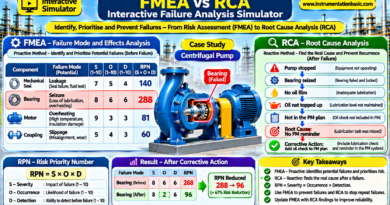
FMEA is a systematic method used to identify possible equipment or process failures, understand their effects, evaluate the associated risks and decide which corrective actions should be taken first.
This interactive FMEA simulator helps you explore these concepts using a simplified process plant. You can select equipment, introduce different failure modes, adjust risk ratings, calculate the Risk Priority Number (RPN) and apply corrective actions to see how the risk changes.
1. What Is FMEA?
Failure Mode and Effects Analysis is a structured technique used to identify potential failures before they cause serious problems.
Instead of waiting for equipment to fail, engineers study how each component could fail and evaluate the possible consequences.
For example, consider a centrifugal pump transferring liquid from one tank to another.
Possible failure modes include:
- Pump seal leakage
- Motor trip
- Pump cavitation
- Low suction level
- Blocked outlet line
Each failure has a different effect on the process. A motor trip may stop the flow completely, while a seal leak may cause product loss and reduce pump performance.
FMEA helps engineers document these failure scenarios and decide which ones need attention first.
2. Important Terms Used in FMEA
Before working with the simulator, it is useful to understand three important terms.
2.1 Failure Mode
A failure mode describes the specific way in which an equipment item or process can fail.
Examples:
- Control valve stuck open
- Pump motor trip
- Pressure transmitter signal lost
- Tank outlet blocked
- Pump seal leakage
The failure mode describes what has gone wrong with the equipment.
2.2 Failure Effect
The failure effect explains what happens when a particular failure occurs.
For example:
- A pump motor trip can stop liquid transfer.
- A control valve stuck open can cause excessive flow.
- A transmitter reading low can make the controller open the valve more than required.
- A blocked tank outlet can interrupt the process flow.
Understanding the effect is important because the same equipment can have several failure modes with different consequences.
2.3 Corrective Action
A corrective action is a measure recommended to reduce the risk or improve the ability to detect a failure.
Examples include:
- Installing a standby pump
- Adding a low-level alarm
- Installing a second transmitter
- Providing valve position feedback
- Performing regular calibration
- Introducing partial-stroke testing
The selected action should address the actual failure mechanism and its consequences.
3. Understanding the FMEA Risk Parameters
The simulator uses three parameters to evaluate each failure mode:
- Severity (S)
- Occurrence (O)
- Detection (D)
Each parameter is rated from 1 to 10.
3.1 Severity (S)
Severity indicates how serious the consequences of a failure can be.
A higher severity rating means the failure can have more serious effects on the process, equipment or operation.
For example:
- A minor equipment issue with limited process impact may receive a lower rating.
- A pump trip that stops production may receive a higher rating.
- A failure that causes a major process safety consequence may require a very high rating.
Severity focuses on the consequence of the failure, not how frequently it occurs.
3.2 Occurrence (O)
Occurrence indicates how frequently a particular failure is expected to happen.
A higher occurrence rating represents a greater likelihood or frequency of failure.
For example:
- A failure rarely observed during operation may receive a lower rating.
- A recurring valve sticking problem may receive a higher rating.
- Equipment with a repeated history of failures may require closer attention.
Historical maintenance records, operating experience and reliability data can help determine the occurrence rating.
3.3 Detection (D)
Detection indicates how difficult it is to identify the failure before its effect occurs.
A higher detection rating means the failure is more difficult to detect.
For example:
- A motor trip indicated immediately through a protection system may receive a lower detection rating.
- A transmitter that gradually drifts without an alarm may receive a higher rating.
- A hidden valve seat leakage problem may remain unnoticed until its effect becomes visible.
In this rating approach, 10 represents poor detectability. A higher detection score therefore increases the RPN.
4. What Is Risk Priority Number (RPN)?
The Risk Priority Number is calculated by multiplying Severity, Occurrence and Detection.
RPN = Severity × Occurrence × Detection
For example, consider a control valve failure with the following ratings:
- Severity = 8
- Occurrence = 4
- Detection = 6
RPN = 8 × 4 × 6
RPN = 192
A higher RPN indicates a higher combined risk score and helps engineers identify failure modes that need further attention.
The simulator uses these indicative categories:
- RPN below 100 – Low
- RPN from 100 to below 200 – Medium
- RPN of 200 or above – High
These categories are simplified learning thresholds used by this simulator. Actual FMEA projects should define their own risk criteria based on company procedures and the type of assessment.
It is also important to remember that RPN should not be the only factor used to make decisions. A failure with very high severity may need attention even if its overall RPN is comparatively low.
5. Understanding the Process Plant in the Simulator
The simulator uses a simplified liquid transfer system containing four main equipment items.
5.1 Tank T-101
T-101 represents the source tank from which liquid is transferred.
The tank level changes depending on the simulated operating condition.
Possible failure modes include:
- Outlet blocked
- Low level
- Overfill
A low tank level can cause pump starvation and cavitation. An overfill condition can result in liquid spilling from the tank.
5.2 Pump P-101
P-101 represents the pump used to transfer liquid through the process line.
The pump is driven by an electric motor.
Possible failure modes include:
- Seal leak
- Motor trip
- Cavitation
A motor trip stops the pump, resulting in no flow. Seal leakage can cause product loss, while cavitation can result in vibration and reduced flow.
5.3 Flow Transmitter FT-101
FT-101 measures the flow through the process line and provides a measurement signal to the flow indicating controller.
Possible failure modes include:
- Incorrect low reading
- Signal lost
- Transmitter drift
A transmitter reading low can cause the controller to demand more flow by opening the control valve further. This may result in excessive flow and overfilling of the downstream vessel.
A lost signal can also affect the control response.
5.4 Flow Control Valve FV-101
FV-101 controls the liquid flow based on the controller output.
Possible failure modes include:
- Stuck closed
- Stuck open
- Seat leaking
A valve stuck closed stops the flow, while a valve stuck open may cause excessive flow.
Seat leakage can allow a small amount of unwanted flow even when the valve is expected to close.
The downstream vessel V-102 displays the effect of these process conditions.
6. How to Use the Interactive FMEA Simulator
The simulator allows you to select equipment, introduce failures, adjust ratings and evaluate corrective actions.
Step 1: Select an Equipment Item
Start by selecting one of the equipment items in the process diagram:
- T-101 – Tank
- P-101 – Pump
- FT-101 – Flow Transmitter
- FV-101 – Control Valve
You can select the equipment directly from the diagram or use the equipment selection buttons below it.
Step 2: Select a Failure Mode
After selecting the equipment, the available failure modes will appear.
For example, selecting P-101 displays:
- Seal leak
- Motor trip
- Cavitation
Select a failure mode to see its effect on the process diagram.
The simulator also displays a short description of the expected effect.
Step 3: Observe the Process Effect
Watch the animated process diagram after selecting a failure.
Depending on the selected failure, you may observe:
- Reduction or stoppage of flow
- Changes in tank and vessel levels
- Pump vibration
- Leakage indications
- Abnormal control valve position
- Transmitter signal problems
- High or low level indications
This helps connect the equipment failure with its process consequences.
Step 4: Adjust the Risk Ratings
Use the three sliders to adjust:
- S – Severity
- O – Occurrence
- D – Detection
The RPN value and risk indication update as you change the ratings.
Try different values and observe how each parameter affects the final RPN.
Step 5: Add the Failure to the FMEA
Once you have reviewed the failure mode and its ratings, click Add to FMEA.
The selected failure will be added to the FMEA table.
The table displays the equipment, failure mode, S, O, D and RPN values, along with the suggested corrective action.
The listed failure modes are arranged according to their RPN, with higher values appearing first.
Step 6: Apply a Corrective Action
Click the Fix button next to a failure in the FMEA table.
The simulator records the original RPN and reduces one risk rating by three points:
- If the suggested action is marked for occurrence reduction, the occurrence rating is reduced.
- If the suggested action is marked for detection improvement, the detection rating is reduced.
The updated RPN is then displayed alongside the original RPN.
This is a simplified demonstration of risk reduction. In an actual FMEA, the revised ratings should be justified using the expected effectiveness of the implemented action and supporting evidence.
Step 7: Use the Other Simulator Controls
Random Failure: Selects a failure mode randomly from the available equipment failures.
Normal Plant: Clears the current selection and returns the process display to its normal condition. It does not clear the existing FMEA entries.
Reset All: Resets the simulator, including the selected failures, risk ratings and FMEA entries.
Fullscreen: Expands the simulator to use the available screen area, making it easier to explore the process diagram and FMEA table.
7. Practical FMEA Exercises
The following exercises will help you understand how equipment failures influence risk assessment.
Exercise 1: Understand a Pump Motor Trip
- Select P-101.
- Choose Motor Trip.
- Observe the process flow and downstream vessel.
- Note the initial Severity, Occurrence and Detection ratings.
- Calculate the RPN.
- Add the failure to the FMEA table.
Think about how a standby pump could reduce the operational impact of this failure.
Exercise 2: Evaluate Pump Cavitation
- Select P-101.
- Choose Cavitation.
- Observe the pump vibration and reduced flow.
- Increase the Occurrence rating.
- Watch how the RPN changes.
- Consider whether a vibration monitoring system would help detect the problem.
This exercise demonstrates how equipment condition monitoring can support failure detection.
Exercise 3: Understand Transmitter Drift
- Select FT-101.
- Choose Drift.
- Observe the transmitter reading and downstream vessel level.
- Adjust the Detection rating.
- Compare the RPN at different ratings.
- Consider how regular calibration could help identify measurement errors.
This is a useful example of how an instrumentation problem can influence the entire control loop.
Exercise 4: Evaluate a Control Valve Stuck Open
- Select FV-101.
- Choose Stuck Open.
- Observe the increase in downstream vessel level.
- Review the suggested corrective action.
- Add the failure to the FMEA table.
- Apply the Fix action and compare the original and revised RPN.
Think about the importance of valve position feedback and testing.
Exercise 5: Compare High and Low Risk
Select different failure modes and compare their RPN values.
Try changing only one parameter at a time.
For example, keep Severity and Occurrence constant while increasing Detection from 2 to 8.
Notice how the RPN increases even though the failure itself has not changed.
This helps explain why poor failure detectability can significantly influence the risk score.
8. Industrial Applications of FMEA
FMEA is used across different engineering disciplines to identify and evaluate potential failures.
8.1 Instrumentation and Control Systems
Instrumentation engineers can use FMEA to evaluate:
- Pressure transmitter failures
- Temperature sensor failures
- Flow measurement problems
- Level transmitter faults
- Control valve failures
- Signal and wiring problems
- Controller and control loop issues
It helps identify weak points in measurement and control systems.
8.2 Rotating Equipment
FMEA can be applied to pumps, compressors, motors and other rotating equipment.
Typical failure modes include bearing failure, seal leakage, lubrication problems, overheating and vibration.
8.3 Process Plants
In process industries, FMEA can help evaluate failures that may affect production, equipment availability and process stability.
It can be used during equipment reviews, maintenance planning and reliability improvement activities.
8.4 Maintenance and Reliability Engineering
Maintenance teams can use FMEA findings to identify recurring problems and prioritize improvement actions.
It can also support reliability studies, maintenance strategy reviews and equipment criticality assessments.
9. FMEA and Its Importance in Reliability Engineering
FMEA is more than a document used to record equipment failures. It provides a structured way to understand how individual failures can affect the overall process.
For reliability engineers, it can help identify:
- Equipment with repeated failure problems
- Failure modes with serious consequences
- Weaknesses in existing detection methods
- Opportunities for preventive maintenance
- Requirements for monitoring and protection
- Corrective actions that can improve equipment reliability
FMEA can also provide useful input to other reliability activities, including Reliability-Centered Maintenance (RCM), maintenance optimization and failure investigation.
However, FMEA and RCM are not the same. FMEA identifies and evaluates potential failures, while RCM uses a broader decision process to determine appropriate maintenance and failure management strategies.
10. Important Points to Remember
- FMEA stands for Failure Mode and Effects Analysis.
- A failure mode describes how equipment can fail.
- A failure effect describes the consequence of that failure.
- Severity evaluates the seriousness of the consequence.
- Occurrence evaluates how frequently the failure may happen.
- Detection evaluates how difficult it is to identify the failure.
- RPN is calculated by multiplying S, O and D.
- A higher RPN generally indicates a higher combined risk score.
- Corrective actions should address the actual failure mechanism.
- Revised risk ratings should be supported by evidence in real engineering assessments.
- RPN should not replace engineering judgement or override serious high-severity concerns.
Conclusion
FMEA is a valuable tool for identifying potential equipment failures and understanding their effects before they lead to major operational problems.
By evaluating Severity, Occurrence and Detection, engineers can compare failure modes and identify where improvement actions may be required.
This interactive process plant simulator provides a practical way to explore equipment failures, calculate RPN values and understand how corrective actions can influence risk ratings.
Try different failure scenarios, adjust the ratings and observe how a problem with one component can affect the complete process.
Learn more about instrumentation, control systems and practical engineering concepts at InstrumentationBasic.
Website: https://www.instrumentationbasic.com/
Training Note: This simulator is designed for learning FMEA fundamentals. Its example ratings, risk categories and corrective-action adjustments are simplified for demonstration. For actual plant assessments, follow your organization’s approved FMEA methodology, risk matrix and engineering procedures.